- Authors

- Name
- Desi Ilieva
Previous Article
Next Article
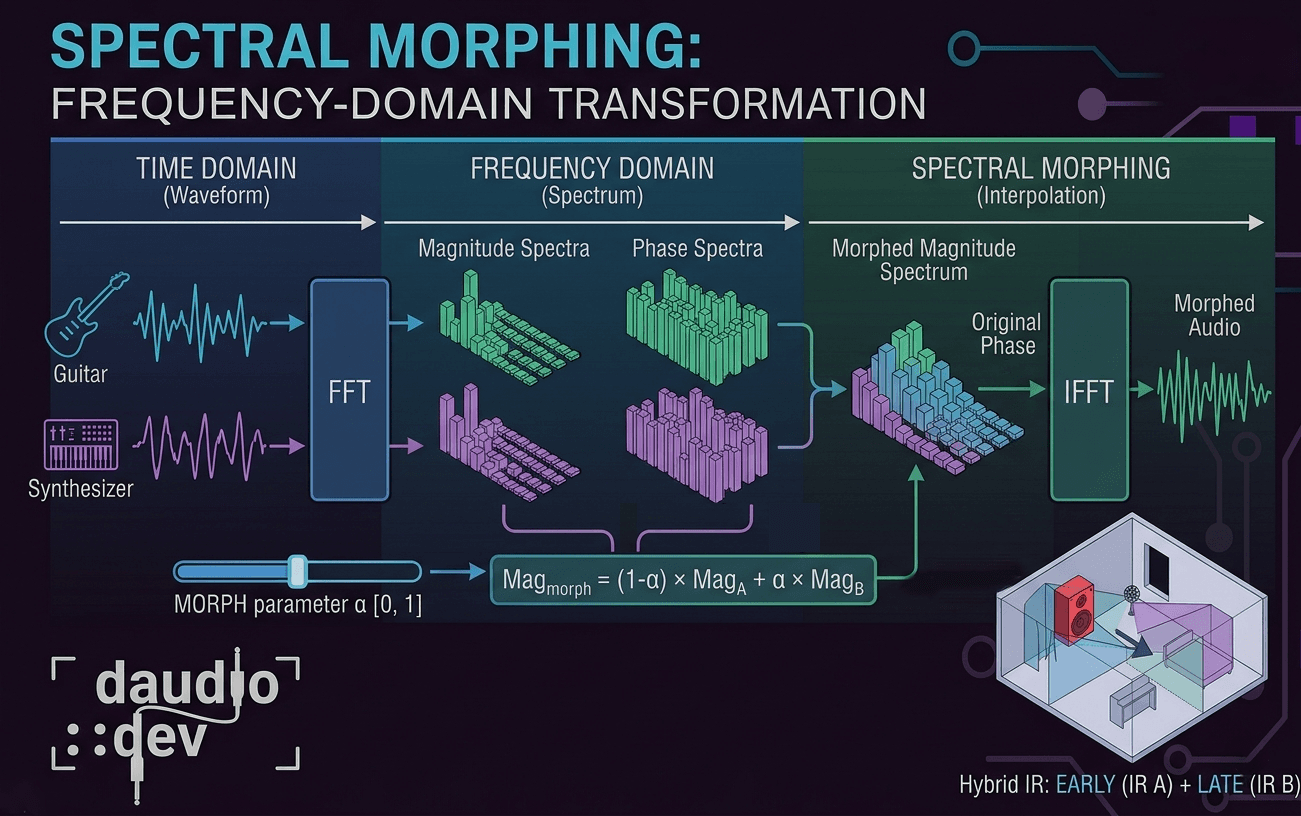
Spectral morphing lets you blend the tonal character of two audio signals at the frequency level — not just in amplitude. It's one of those techniques that sounds complex until you break it down into what's actually happening under the hood.
The two domains
Every audio signal can live in two worlds:
The time domain is the familiar waveform — amplitude over time. It's what you see in your DAW when you zoom into a clip.
The frequency domain is what you get after running a Fourier Transform. Instead of "amplitude at time T", you see "magnitude and phase at frequency F". This reveals which frequencies are present and how strong they are.
The Fast Fourier Transform (FFT) converts between these two. Spectral morphing lives entirely in the frequency domain — you go in with an FFT, do your work, and come back out with an inverse FFT (IFFT).
So what is spectral morphing?
Instead of just mixing two signals together in the time domain (which is just addition), spectral morphing blends their frequency characteristics.
It works in three steps:
- Do FFT to analyze the magnitude and phase spectra of both signals independently.
- Interpolate between them using a morph parameter α (from 0 = 100% signal A, to 1 = 100% signal B).
- Reconstruct the audio with the blended spectrum via IFFT.
Spectral Morphing vs. EQ or crossfading? Traditional crossfading mixes amplitudes. EQ shapes a fixed response. Spectral morphing shapes the actual frequency content of both signals dynamically, producing hybrid timbres that can't exist in any other way.
The core techniques
1. Magnitude spectrum interpolation
The magnitude spectrum defines how loud each frequency bin (bin: a small frequency band produced after the FFT) is. The simplest morph is a weighted linear blend:
Mag_morph[f] = (1 - α) × Mag_A[f] + α × Mag_B[f]
This works but can sound unnatural when the two signals are very different. A better option is logarithmic interpolation:
Mag_morph[f] = Mag_A[f]^(1-α) × Mag_B[f]^α
This preserves relative energy relationships between frequency bins, which is how our ears actually perceive loudness. For big timbral jumps — say, morphing a piano into white noise — the log version sounds much more musical.
2. Phase spectrum management
Phase is where things get tricky. Directly interpolating phase values causes ugly artifacts because phase wraps around — you'd need to unwrap it first, which adds complexity.
In practice, the most common approach for real-time processing is phase preservation: keep the phase from signal A (the dominant source) and only morph the magnitudes.
Spectrum_morph[f] = Mag_morph[f] × exp(i × Phase_A[f])
Simpler, fewer artifacts, and computationally cheap. Most real-time spectral morphing tools use this approach.
3. Frequency-dependent morphing
Instead of a single global α for the whole spectrum, you can assign a different morph amount per frequency band:
α[f] = morph_curve(frequency)
This opens up creative territory like morphing only the low end of a room IR while leaving the highs untouched, or creating spectral zones where different frequency ranges come from entirely different sources. You can also automate morph curves over time for evolving textures.
How this works in DIRLoader
DIRLoader's frequency-response morphing system does exactly this. When you blend two impulse responses (IR A and IR B), it's not just a time-domain crossfade — it's operating on the frequency-domain representations of both IRs directly.
It let's you create hybrid acoustic spaces — like a space that has the impulse response of a small booth but blended with the one of a cathedral — something that doesn't exist in any real room.
Technical realities
Let's face it - it's difficult to create spectral morphing that works well, especially in real-time, and it always comes at cost.
FFT windowing and artifacts
Spectral processing doesn't work on raw audio directly. You break the signal into overlapping frames, window each frame (Hann or Blackman windows are common), process in the frequency domain, then reassemble via overlap-add. Without proper windowing you get nasty clicks and spectral leakage at frame boundaries.
A 50–75% overlap between frames balances artifact reduction against CPU cost.
Latency
FFT size determines your latency. A 2048-sample FFT at 48kHz adds ~43ms of latency. For real-time performance use 512–1024 samples — you lose some frequency resolution but keep latency under 10ms. For offline processing or IR manipulation, you can use larger FFTs without penalty, but it still depends on also on your system's capabilities.
CPU cost
Spectral morphing is expensive. Common optimizations you can use:
- Use SIMD-optimized FFT libraries (FFTW, Apple vDSP, Intel IPP)
- Pre-compute spectral data for static sources like IRs — don't recompute on every buffer
- Process only the frequency bands that matter for your effect
Creative uses of the Spectral Morphing
Convolution reverb reshaping is the obvious one — that's DIRLoader's territory of usage. But the same technique applies across the board:
Vocal processing: blend formant structures between different voices. Used in vocoders, gender-transformation effects, and voice morphing plugins.
Sound design: cross-synthesize completely unrelated sounds — a piano and white noise, a guitar string and a sine wave. The result inherits frequency characteristics from both in a controlled way.
Spectral freezing: capture the FFT frame at a specific moment and hold it — any transient becomes an infinite drone.
Spectral filtering: use signal A's magnitude spectrum as a filter shape applied to signal B. Basically a high-resolution vocoder.
Summary
Spectral morphing is one of those tools that feels intimidating until you realize it's just interpolation — in a smarter domain.
- Spectral morphing blends frequency content between signals, not just their amplitudes
- Linear interpolation works, but logarithmic interpolation sounds more musical
- Phase preservation (keep phase from source A, morph only magnitudes) is the standard approach for real-time use
- Frequency-dependent morph curves let you independently control different bands
- DIRLoader uses this to blend IR frequency responses, enabling hybrid spaces that don't exist in reality
- Latency = FFT size ÷ sample rate — smaller FFT means lower latency but less frequency resolution
- Pre-compute everything you can — spectral morphing is CPU-heavy
Knowing what's happening in the frequency domain is what separates "it sounds weird" from "I know exactly why it sounds weird and how to fix it."