- Authors

- Name
- Desi Ilieva
Previous Article
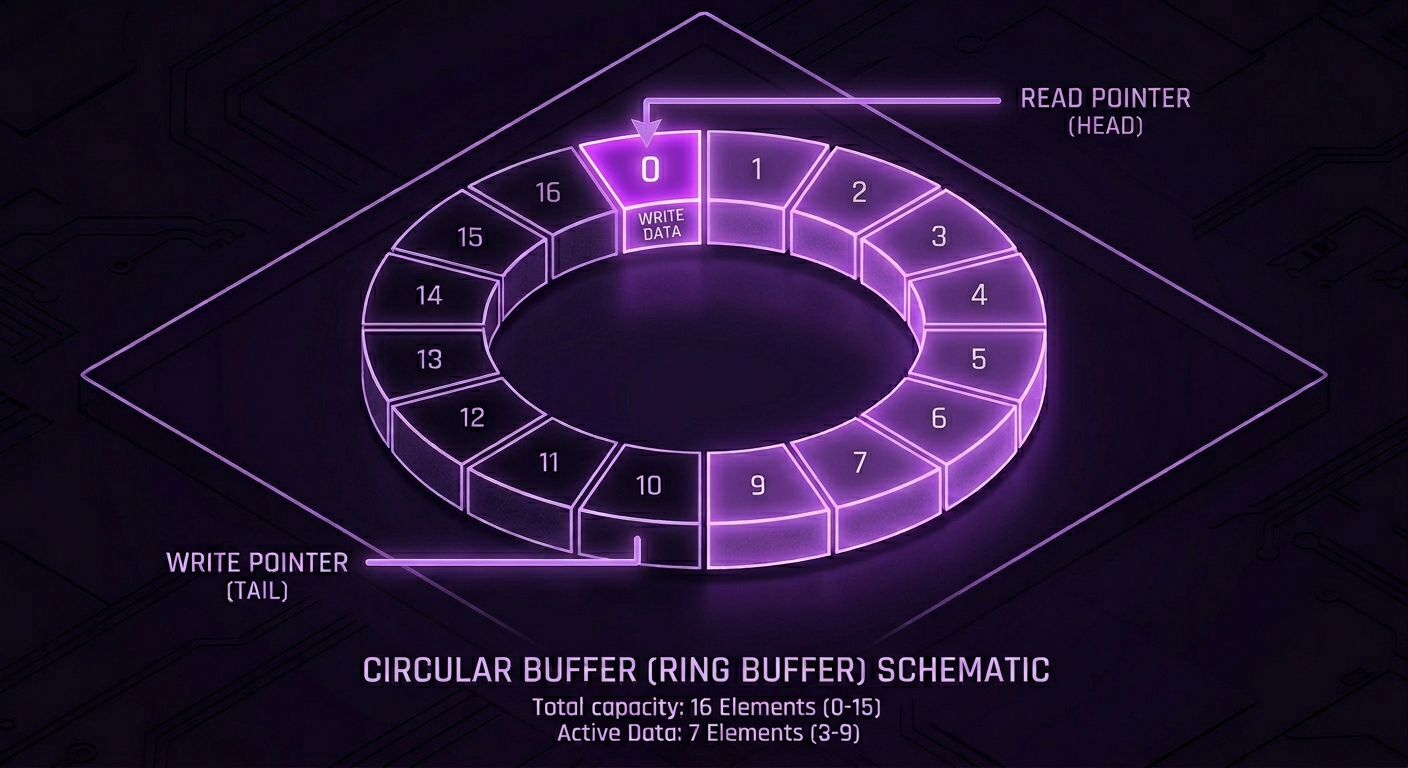
A lot of audio effects come down to one thing: accessing the past. Delays, chorus, flangers, reverbs — they all need to read audio from some point back in time. A circular buffer is how you do that without constantly allocating memory or shuffling data around.
Introduction
A circular buffer (also called a ring buffer) is a fixed-size array that wraps around when it reaches the end. Instead of allocating new memory for every new sample or moving existing data to make room, you write into the same block of memory continuously, which overwrites the old samples once they're no longer needed.
It's one of the most common data structures in DSP, and once you understand how it works, it's hard to unsee it. It's inside almost every effect that involves time.
- The Basic Idea
- Writing and Reading
- Why Audio DSP Uses This
- Interpolation
- Linear Interpolation in Code
- Types of Interpolation
- Summary
The Basic Idea
Imagine a buffer with a size of 8 slots:
[ 0 ][ 1 ][ 2 ][ 3 ][ 4 ][ 5 ][ 6 ][ 7 ]
You write samples into it one at a time, advancing a write pointer each time. When the pointer reaches index 7 and you increment it, instead of going out of bounds it wraps back to 0:
7 → 0
And you just continue writing, overwriting the oldest data. The buffer never grows, nothing moves in memory, just the same 8 slots get reused indefinitely. That's the whole concept.
Writing and Reading
A basic write operation looks like this:
buffer[writePos] = sample;
writePos++;

if (writePos >= size)
    writePos = 0;
Or more concisely using the modulo operator:
buffer[writePos] = sample;
writePos = (writePos + 1) % size;
Both do the same thing — the pointer advances and wraps.
Reading works the same way. If you want a sample from 300 ms ago, you calculate how many samples that corresponds to at your sample rate, and read from that position relative to the write head:
int delaySamples = (int)(delayMs * sampleRate / 1000.0f);
int readPos = (writePos - delaySamples + size) % size;

float delayedSample = buffer[readPos];
The + size before the modulo is there to handle negative values when writePos < delaySamples. Without it you'd wrap into negative indices.
Why Audio DSP Uses This
Audio is a continuous stream. Effects that work with time need access to recent history — samples from milliseconds or even seconds ago. The naive approaches don't work well:
- Allocating new memory per sample — constant allocation in a real-time audio context is a problem. Memory allocation can block for unpredictable amounts of time, which causes dropouts.
- Shifting an array — moving all existing samples one slot forward every time you write a new one is O(n) per sample. At 48 kHz with a long delay, that's a lot of unnecessary work.
A circular buffer solves both. The memory is allocated once upfront and reused. Reading and writing are both O(1). The buffer size just needs to cover the maximum delay time you'll ever need.
Effects that rely on this:
- Delay — reads a fixed number of samples behind the write head
- Chorus — reads at a slowly modulated position behind the write head
- Flanger — same as chorus but with shorter, faster modulation
- Reverb — multiple read taps at different positions, often with feedback
- Pitch shifting — reads at a rate different from the write rate
- Granular DSP — reads arbitrary grain windows from the buffer
All of these are just variations on the same idea: write audio continuously into a fixed-size loop, read from somewhere behind.
Interpolation
Here's where it gets more interesting.
So far, the read position has been an integer — sample 100, sample 101, etc. That works fine for a static delay. But most of the effects listed above involve modulated read positions — the delay time changes over time. Chorus and flanger use an LFO to sweep the read head back and forth. Pitch shifting reads at a different rate than the write head. Doppler simulation does the same.
The problem: when the read position is changing continuously, it stops landing on integer indices.
100 → 100.12 → 100.25 → 100.37 → ...
You can't index into an array at position 100.37. Arrays have integer indices. So what do you do?
Interpolation estimates the value at a fractional position between two known samples. The idea is simple — if you know the value at sample 100 and the value at sample 101, you can estimate what the value would be at 100.37 by blending the two.
Without interpolation, you'd have to round to the nearest integer every time. That causes zipper noise — audible stepping artifacts as the read position jumps from one integer to the next, especially noticeable in chorus and flanger where the modulation is slow and continuous.
Linear Interpolation in Code
The simplest and most common form is linear interpolation. Given two adjacent samples a and b, and a fractional position t between them:
y = (1 - t) * a + t * b
Where t is the fractional part of the read position — how far you are between sample i0 and sample i1.
In code, with a circular buffer:
float readPos = 100.25f;

int i0 = (int)readPos;
int i1 = (i0 + 1) % size;

float frac = readPos - i0;

float y = buffer[i0] * (1.0f - frac)
        + buffer[i1] * frac;
For the example above — buffer[100] = 0.2, buffer[101] = 0.6, t = 0.25:
y = 0.75 * 0.2 + 0.25 * 0.6 = 0.15 + 0.15 = 0.3
Smooth, continuous output regardless of where the read position lands.
Note the % size on i1 — the read position could be near the wrap point of the buffer, so i1 might need to wrap back to index 0. The modulo handles that.
Types of Interpolation
Linear is the starting point but it's not the only option. There's a quality/cost tradeoff across the different methods:
Linear Uses 2 samples. Cheapest to compute. Works well enough for most modulated delay applications. Can introduce a small amount of high-frequency roll-off since it's essentially a simple low-pass operation on the fractional part.
Cubic Uses 4 samples (two on each side). Fits a cubic curve through the points instead of a straight line. Noticeably smoother, especially at slower modulation rates where the difference is more audible.
Hermite Also 4 samples, similar to cubic but uses derivative constraints at each point for a smoother curve. A popular choice in DSP code because it's a good balance between quality and cost — better than linear, cheaper than sinc.
Lagrange High-quality fractional delay. Used in physical modeling synthesis (waveguides, etc.) where accuracy at the fractional delay matters a lot for the resonant frequency of the model.
Sinc The theoretically correct method. Convolves the signal with a windowed sinc function across many neighboring samples. Essentially exact for band-limited signals. Used in professional resampling. Expensive — rarely used for real-time modulated delays.
The choice of interpolation method usually comes down to what the effect is doing. A chorus LFO sweeping slowly makes stepping artifacts very audible, so cubic or Hermite is worth the cost. A pitch shifter running in real-time might prioritize Hermite for the tradeoff. A sample rate converter cares a lot about accuracy, so sinc is justified.
Summary
A circular buffer is a fixed-size array with a write pointer that wraps around — old samples get overwritten once they're no longer needed. It gives you constant-time reads and writes with no allocation or data movement:
- Why it's used in audio — effects need efficient access to audio history; circular buffers give you that with O(1) reads and writes and a single upfront allocation
- Write — advance a pointer, wrap with modulo when it hits the end
- Read — offset back from the write head by however many samples correspond to the desired delay time
- Interpolation — when the read position is fractional (as it is in any modulated effect), you estimate the value between integer samples to avoid stepping artifacts
- Linear interpolation — blend two adjacent samples using the fractional part of the read position:
y = (1 - t) * a + t * b - Higher-order interpolation (cubic, Hermite, sinc) — use more neighboring samples for a smoother estimate, at increasing computational cost
- Effects that depend on this — delay, chorus, flanger, reverb, pitch shifting, vibrato, granular, Doppler simulation — basically anything in DSP that reads from the past at a varying position
If you've used any of those effects, you've been listening to circular buffers and interpolation working together the whole time.