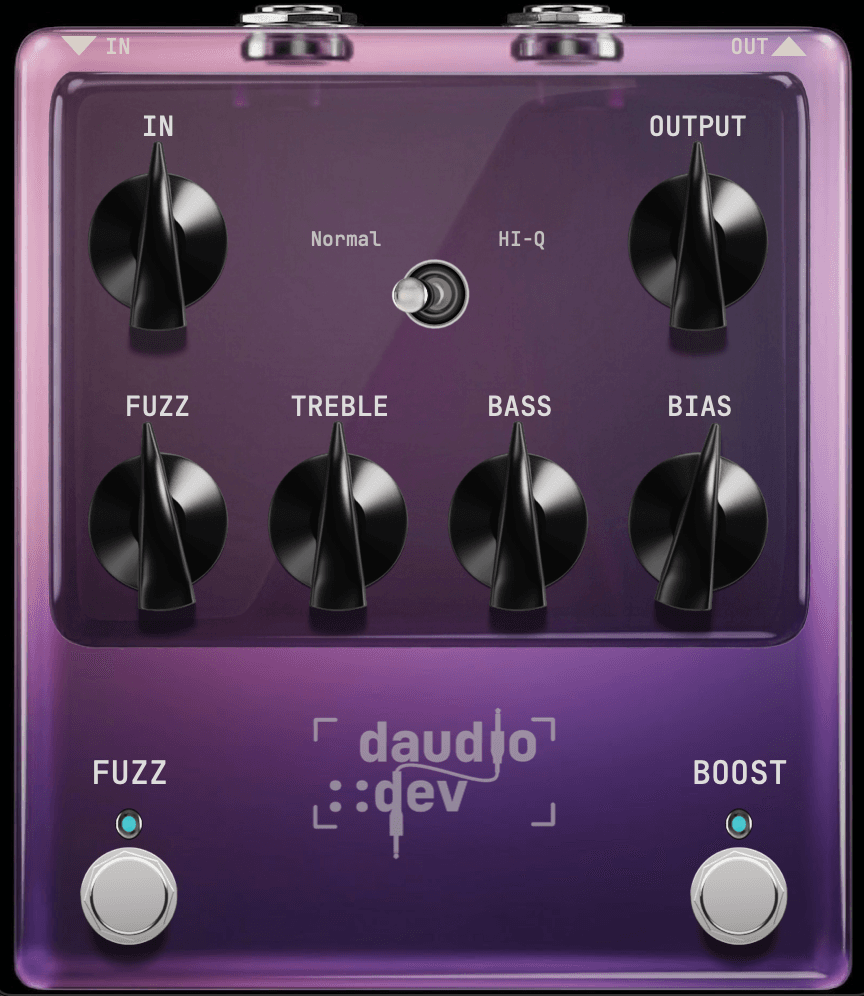
DFUZZ – vintage fuzz plugin
Vintage analog feel fuzz for VST3 & AU
A vintage-style fuzz pedal for guitar and other sources, modeled after the character of classic fuzz circuits — Fuzz Face–style cleanup, asymmetric clipping, and touch-sensitive dynamics, wrapped in a stompbox-style UI.
Loading…
How does it sound?
Same guitar take — toggle between dry and fuzzed. Hit play, then flip Clean / With DFUZZ.
What it does
DFUZZ takes your dry signal through a full fuzz chain for a warm, responsive tone that cleans up with your guitar volume and playing dynamics — not a flat digital distortion.
Input stage
Gain and input impedance shaping
Pre-filter
High-pass and mud control to keep the low end tight
Fuzz stage
Oversampled saturation with bias, threshold, and softness (4× or 16× sample rate)
Tone stack
Bass and treble EQ
Power amp color
Subtle harmonic shaping to add a bit of tube warmth
Cab filter
A low-pass rolloff
Vintage squash
Gentle downward compression for a vintage amp feel
Controls
| Control | What it does |
|---|---|
| IN | Input level (−24 to +24 dB) |
| OUTPUT | Output level |
| FUZZ | Main fuzz amount — low settings stay in the cleanup range; higher settings push into saturated territory |
| TREBLE | Brightness / top-end EQ |
| BASS | Low-end EQ |
| BIAS | Shifts the clipping character — adds texture and asymmetry without killing the signal |
| Normal / HI-Q | Normal = 4× oversampling; HI-Q = 16× oversampling for cleaner high-gain tones (more CPU) |
| FUZZ (stomp) | Turn on the fuzz effect |
| BOOST (stomp) | Adds +6 dB clean boost |
Tips
- 01Start with FUZZ around noon and adjust IN/OUTPUT to match your DAW level.
- 02Roll your guitar volume down for classic cleanup tones — the fuzz stage responds to playing dynamics.
- 03Use BIAS lightly — small moves change the texture noticeably.
- 04Enable HI-Q when recording heavy fuzz; use Normal for lower CPU during tracking.
System requirements
- macOS 11 or later
- Windows 10 or later
- Apple Silicon or Intel
- Any DAW that supports VST3 (AU on macOS)
Installation
From the DMG installer (recommended)
- Open
DFUZZ-<version>-Installer.dmg - Double-click Install DFUZZ.pkg
- Restart your DAW and rescan plugins
Installs to
- /Library/Audio/Plug-Ins/VST3/DFUZZ.vst3
- /Library/Audio/Plug-Ins/Components/DFUZZ.component
Licensing
DFUZZ uses online license activation. On first launch you will be prompted to enter your license key. The plugin UI is unlocked once a valid license is activated.
Need help? Contact support
Frequently asked questions
Explore more
- Dirty Space BundleDFuzz + DDelay — DClipper free
- DDelayStereo delay suite with independent L/R engines
- DClipperDiode-style soft clipper — two knobs, one switch
- UI KitsFilmstrip knobs & faders for your own plugin GUIs
- Distortion & DSP articlesLearn clipping, waveshaping, and oversampling
- All pluginsFree and paid tools from daudio::dev
Get DFUZZ
Lifetime license · VST3 & AU · macOS & Windows · €29