DDelay – stereo delay plugin
Dual L/R delay engines for VST3 & AU
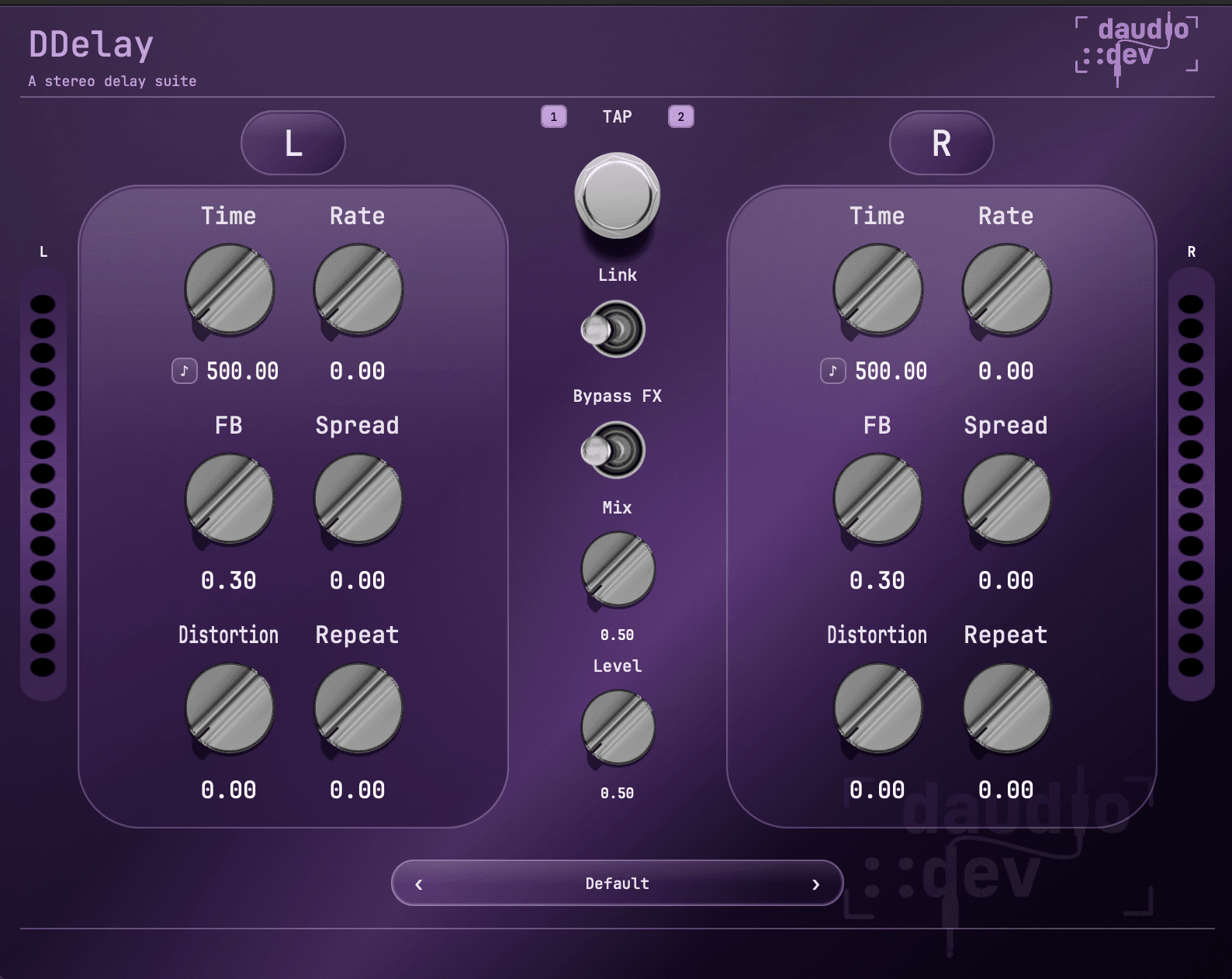
A dual-channel stere delay with independent L/R timing, tempo sync, tap tempo, stereo spread, grit, and self-oscillating repeats, wrapped in a clean daudio UI.
Loading…
How does it sound?
Same take — toggle between dry and delayed. Hit play, then flip Clean / With DDelay.
What it does
DDelay runs your signal through a stereo delay engine with liked or per-channel control. Set time, feedback, width, and character independently on left and right, lock to tempo, or tap it in by feel.
Dual delay lines
Independent left and right time (0–2000 ms)
Feedback
Repeat amount per channel (up to near self-oscillation)
Spread
Stereo width / cross-channel placement
Distortion
Grit and saturation in the delay path
Repeat
Extra regeneration / bloom on top of feedback
Tempo sync
Musical note divisions (1/2 through 1/16, dotted & triplet)
Tap tempo
Arm TAP, pick targets 1/2, tap twice to set TIME in ms
Mix & Level
Wet/dry blend and overall output
Controls
| Control | What it does |
|---|---|
| TIME L / R | Delay time in milliseconds (0–2000 ms), or note division when sync is on |
| FB L / R | Feedback — how long echoes keep going |
| Spread L / R | Stereo width / ping-pong-style placement |
| Distortion L / R | Saturation in the delay path — tape-like grit to heavier dirt |
| Repeat L / R | Extra regeneration — builds denser, blooming trails |
| Sync L / R | Lock time to host BPM with note divisions |
| Link | Mirror left settings to right (or keep channels independent) |
| Tap | Arm the TAP pedal, choose targets 1 (L) and/or 2 (R), then tap twice in rhythm to set TIME in ms. Long-press to disarm. Tap turns Sync off on targeted channels. |
| Mix | Dry / wet balance |
| Level | Overall output level |
Factory presets
Eight built-in presets — browse with the arrows in the plugin UI. Every control stays editable after you load a preset.
| Preset | Vibe |
|---|---|
| Default | Neutral 500 ms starting point |
| Tape Slap | Short slapback with grit |
| Ping-Pong | Asymmetric L/R times, wide stereo bounce |
| Dirty Long | Long echoes with distortion and repeat |
| Edge Dotted | Tempo-synced dotted-eighth edge |
| Triplet Grid | L/R triplet vs straight eighth grid |
| Dub Wide | Quarter-note dub space with spread and bloom |
| Osc Bloom | Long synced trails pushing toward self-oscillation |
Tips
- 01Start with Default or Tape Slap, then nudge Mix to sit in the track.
- 02Unlink L/R and offset times for instant ping-pong without a dedicated mode.
- 03Enable Sync and try Edge Dotted or Triplet Grid when the track is tempo-locked.
- 04Raise FB and Repeat carefully — Osc Bloom shows how far it can go.
- 05Use Tap when writing to feel: arm the pedal, enable targets 1 and/or 2, then tap twice. Long-press TAP to exit.
System requirements
- macOS 11 or later
- Windows 10 or later
- Apple Silicon or Intel
- Any DAW that supports VST3 (AU on macOS)
Installation
From the DMG installer (recommended)
- Open
DDelay-<version>-Installer.dmg - Double-click Install DDelay.pkg
- Restart your DAW and rescan plugins
Installs to
- /Library/Audio/Plug-Ins/VST3/DDelay.vst3
- /Library/Audio/Plug-Ins/Components/DDelay.component
Licensing
DDelay uses online license activation. On first launch you will be prompted to enter your license key. The plugin UI is unlocked once a valid license is activated.
Need help? Contact support
Frequently asked questions
Explore more
- Dirty Space BundleDFuzz + DDelay — DClipper free
- DFUZZVintage-style fuzz with oversampled saturation
- DClipperDiode-style soft clipper — two knobs, one switch
- UI KitsFilmstrip assets for building your own plugin UI
- DSP blogTutorials on delay, distortion, and JUCE
- All pluginsFree and paid tools from daudio::dev
Get DDelay
Lifetime license · VST3 & AU · macOS & Windows · €29